Video Optimization Process [infographic]

Do you ever wonder why your video does not appear in search results? Looking to improve your SERP ranking for your content that also contains video? Do you want to gain more traffic, and a larger audience through your video? This infographic provides some great tips to help. Follow these six steps to help improve your position in search engine results and get more visibility to your content that includes video.

Source: http://www.linkxseo.com/2013/04/infographic-video-optimization-process.html

Tags: seo, video, Internet

A Human Element In The Digital Realm

Bits-n-Bytes.


I've been thinking for some time now that things have been somewhat different in the digital arena... seems like there's something missing, or perhaps there's just less of it and when you see it, it's more apparrent or obvious. I'm talking about the human element. It's that essence which separates the "wheat from the chaff." It is evident in the threads that weave a social fabric that keeps us warm, gives us protection, and transcends the boundaries of location, time or language. You know it when you see it. That little bit of humanity that can't be easily replicated by a device or software algorhythm. Don't get me wrong, I love machines, robots, and artificial intelligence — but they just don't have that element.

Here's some relevant sounds to groove on while you read the post...


Anti-Social Media: Signal or Noise?

I've noticed the lack of that human element most in social media. Seems like folks are more focussed on followers, +1's and likes than in actual participation the game: the fun stuff, the sharing, the  "Hey, how you doin'? Long time no speak..." or witty writings on my wall, and engaging with others. We become the proverbial "rats running races." Yeah, everybody's busy, and I'm guilty of some of it from time to time too. Yup. But I work long hours at my full-time job and try to do side projects whenever I can. I do my reading and try to stay on top of trends and everything new. Add to that all the family stuff, chores, errands and things that just seem to swallow-up any remaining time that's left over. That said, I still I try hard not to make a habit of it and I always try to be myself, be inclusive and stay sincere.

What, Me Worry?

Sometimes I get discouraged and think, "why bother logging in" and wonder if it's "time to get off the social grid." Most of the time I just don't think about it... I generally don't worry about the missing human aspect, but as I said before, I do make an effort to not add to the problem. Nope. Not me. Just like James Brown, 'I'm gonna get-up and do my thang.'

The Human Element is Alive and Kicking.

In the last few weeks I've had the pleasure of seeing that element rise-up and brighten my day. At the end of the day for me it's not really about click-throughs, SEO link-juice, a Klout score, or being the Mayor of FarmVille. Don't get me wrong, that stuff matters too. I love a momentous mention here and there, a bunch of re-tweets, any +1's I can get my mouse on, those funky #FollowFridays... I can't imagine a month without a luscious like now and again. It's just different I guess.

Sometimes, You Get What You Give. 

It's that super-sauce. That dash of goodness sprinkled on it that makes the meal so tasty. The 80/20 rule is in a full frontal attack, yet a subtle signal of secret sauce remains among the nasty noise in the digital realm. Tough to find it, but lately I've enjoyed the luxury of that 20% that has the human element. Once in a while, you get the good stuff. It's the stuff that builds a great brand. Honesty, credibility, integrity, loyalty... keeps 'em coming back for more. With that in mind, here are some folks that are doin' things right and shining bright despite the plight:


LiveFyre
http://livefyre.com
@Livefyre

Sokanu
http://sokanu.com
@sokanu

Inanimatt
http://inanimatt.com
@inanimatt

Formulate
http://formulate.com.au
@Formulate

Zerply
http://zerply.com
@zerply

Thanks for making it more than just another rat race folks :)

1 Minute Interview: Tony Aguilar

A one minute interview with Tony Aguilar, conducted via mobile phone and email. I wanted to keep it brief. Everybody's busy. Got a minute? Read on…

Question: What are three movies, three songs, and three words that mean something to you?

Here's Tony's Answers…

Movies:

  • the Godfather
  • Charlie and the Chocolate Factory
  • Autobiography of a Flea

Songs:

  • Machine Gun, Jimi Hendrix
  • Telephone Line, E.L.O.
  • In my Room, Beach Boys

Words:

  • think.
  • f@ck.
  • play.

…contact him directly if you need elaborations. xo


O'Briens Pub - Allston, MA 8/17/11


Listen here...


Totimoshi Avenger by Totimoshi

Totimoshi Avenger


Totitmoshi links...


:D

Lenticular Business Cards Are Awesome

Yup, I'm totally blown away!


Wow, I just received my new lenticular business cards from The Mines Press (Visit MinesPress.com | follow @theminespress on Twitter) and they look fantastic! A few months ago, I was incredibly lucky and won a set of business cards after entering in a contest on one of my favorite blogs WebExpedition18. I strongly advise you to add their RSS feed, read their articles, and follow @colaja and the other writers and contributers to help you stay on top of all the latest and greatest webdesign trends.

Go on, follow those links in another tab right now... I'll wait here :)

Not "Just Another Surfin' Safari..."


I was doing my daily web surfing and regular reading a few months ago when I stumbled on the WebExpedition18 special giveaway post. I actually just commented and tweated the "Win Attractive Lenticular Business Cards from The Mines Press Inc." post because I thought the cards were super cool. Suffice to say that I was pleasantly surprised about winning the contest — and I am even more surprised at how cool the cards really are after they arrived at my door! Another plus is that he cards arrived more than two weeks before they were scheduled to ship. Extra nice... The cards are absolutely beautiful and the level of quality is stellar. They're double-sided, and incorporate multiple images which are revealed as you view the cards from different angles.

An American Dream Come True


The Mines Press is a family owned company located in New York and has been in business for more than 76 years. The company was started in 1933 during 'The Great Depression' and has grown to more than 130 employees. Yup, they are an example of 'The American Dream' come true and an inspiration in these difficult times... I followed the tips and recommendations on how to make use of the lenticular technology, and I think I was able to leverage it to get really nice results. Their customer service is fantastic, and the high quality of their work is outstanding. That said, if you're looking to stand out from the crowd, I encourage you to visit The Mines Press and have them handle all your future printing needs.

A bit about branding and Identity


These cards are a perfect fit for my brand. My design goals were to support and extend my web presence by matching the 'active', 'alive', and 'playful' nature of my current branding efforts and online identity. Yeah, the lenticular technology is incredibly cool and geeky but more importantly, it also adds a bit of sophistication and an active, lively and techy feel to my otherwise basic business cards.

LINKS:


· Lenticular business cards example & information »

· Read WebExpedition18 »

A few photos of my business cards

The box... Here are a few photos of my new cards... It's tricky to photograph lenticular cards because they change depending on the angle at which you view them. I did my best to capture them in the photos, but it wasn't easy — you need to see and hold them to really appreciate 'em. They have a truly unique feel, and they're definitely unforgettable.


My new business cards have arrived!

A photo of my business cards...
Yet another photo of my business cards...
Another photo of my business cards...
One more photo of my business cards...


Infographic: I Am What I Tweet?!


Fun stuff from the labs at @visually — why not make your own (it's free)?! Or, feel free to follow me @ptamaro 'cause I tweet good tweets :)


Twitterize yourself


The Twitter Visualizer generates a personalized infographic of your Twitter persona based on what you tweet. See how you compare to celebrities ranging from Web gurus like Guy Kawasaki and Kevin Rose to Hollywood’s digerati such as Snoop Dogg, Lady Gaga, Ashton Kutcher and dozens of other celebs...

Try it Out


[http://visual.ly/twitter]

FRESH: Get On The Good Foot!

FRESH is more than a movie, it’s a gateway to action. Our aim is to help grow FRESH food, ideas, and become active participants in an exciting, vibrant, and fast-growing movement.

FRESH celebrates the farmers, thinkers and business people across America who are re-inventing our food system. Each has witnessed the rapid transformation of our agriculture into an industrial model, and confronted the consequences: food contamination, environmental pollution, depletion of natural resources, and morbid obesity. Forging healthier, sustainable alternatives, they offer a practical vision for a future of our food and our planet.

Among several main characters, FRESH features urban farmer and activist, Will Allen, the recipient of MacArthur’s 2008 Genius Award; sustainable farmer and entrepreneur, Joel Salatin, made famous by Michael Pollan’s book, The Omnivore’s Dilemma; and supermarket owner, David Ball, challenging our Wal-Mart dominated economy.

» FRESH the movie

FRESH Details
Total running time: 72 minutes
Production Year: 2009

Produced and Directed by: ana Sofia joanes

View A Trailer...


Will Allen, 6ft 7" former professional basketball player, is now one of the most influential leaders of the food security & urban farming movement. His farm and not-for-profit, Growing Power, have trained and inspired people in every corner of the US to start growing food sustainably.

This man and his organization go beyond growing food. They provide a platform for people to share knowledge and form relationships in order to develop alternatives to the industrial food system.

» Growing Power


April Fools 2011: Pranks Around The Web

april fools 2011
Brought to you by ZippyCart.com and Designed by Killer Infographics

Top April Fools 2011 Pranks Online


Google – Motion gaming has become extremely popular over the past few years with the Wii, Move, and Kinect. Now Google wants to make Gmail motion controlled, thus launching Gmail Motion. No keyboard or mouse needed, hand and body gestures will control everything for you. All of this is detailed on the custom site Google launched for April Fools day. The motion functionality even looks to extend to Google docs, for which Google also created a custom site experience. Another Google prank you will notice when typing in a search today is a job open for autocompleters, and you only need to type 32,000 words per minute to apply.


YouTube - In honor of April Fools, YouTube decided to go retro and give users a feel for what it would have been like for the business in 1911. They even have 1911 logos on all YouTube videos, and when you click it, the video will transform into a vintage, silent, motion picture. Everything will turn to a dirty and grainy yellow accompanied by old-school piano music, looking something like a Charlie Chaplin film.


ThinkGeek – A couple changes popped up on ThinkGeek today, with one being an X over the M in the word masses of their slogan: “stuff for smart masses.” Additionally they have a variety of new products that look to be fake, which is their traditional technique, however in years past some of these prank products have become the real deal. This year some of the fake products include an Apple Store playset, Angry Birds Pork Rinds, Star Wars Light Saber Popsicles, The Original Shirt Plate, and a USB Desktop Nether Portal.


CollegeHumor – When you arrive at the site it appears as if you are logged into their web admin as Intern22, and when you click the admin access it goes into what looks like a fully functional admin panel. However the joke is on you as it does not work, and when you go back to the homepage the folks at CollegeHumor.com confirm that you have been tricked by their April Fools 2011 prank.


GrooveShark – My favorite online music site looks a bit different today, as they decided to harness the power of HTML 5 to bring their users 3DS+. This new technology allows listeners to experience music in the third dimension. They have a link to their blog where you can print out the ridiculous accessories to help you hear the 3DS+ experience.


Mozilla (Firefox) – Many of you reading this may be using Mozilla Firefox, and if you do not want to deal with April Fools pranks online for the rest of the day, then you can get an add-on to fix that. The DNF (Do Not Fool) add-on will let you set the browser to opt-out of April Fools jokes, via a Do Not Fool HTTP header with every click or page view in Firefox.


FunnyorDie – Last year Justin Bieber took over, and now it looks like the recent web fame of Rebecca Black and her song Friday are taking over, with the site renamed FridayorDie. Since many view this as one of the worst songs ever, it is not surprising that FunnyorDie took a stab at it for April Fools. The entire site is now plastered with everything Rebecca Black, so it looks like her 15 minutes of fame will continue a bit longer.


Groupon – When you are a multi-billion dollar company, you better go big for April Fools. Groupon has been raising money and acquiring companies for the last year, and now they have a patent application for the phrase: “April Fools.” They even designed a full PDF patent application where you can see all the funny details.


Reddit – Over the last year Reddit has become increasingly popular, and is now a major part of the Conde Nast business. Reddit, not to be outdone this year for April Fools, decided to launch Reddit Mold, which seems to be almost as good as the real Reddit, but with a few disadvantages. Comments limits go from 500 to 490, but you get access to a secret members-only lounge. Apparently things can get worse, if more people give you Reddit Mold, so be careful.


ZippyCart will be updating this post throughout the day with any new and exciting April Fools’ Day pranks of 2011. Keep your eyes peeled and while you wait, checkout ZippyCart.com for more...

If You Printed My Entire Twitter Timeline...


If you printed @ptamaro's entire twitter timeline...

This includes tweets from 1,790 friends, who collectively have around 5,880,338 tweets.


To print, it would cover
274,415
A4 pages
That would use 5.5 litres of ink!
That's nearly 457 ink cartridges!


That would cost about £8,004 ($13,007)
Using a single inkjet printer to print all that would take about
7 days, 12 hours, and 43 minutes


During that time, around 2,828,868 babies are born worldwide!

50 Fascinating Social Media Facts & Stats Of 2010

Social Media Facts and Stats Infographic

[Source: Today I Found Out]  

 
Today I Found Out...  
All total, about 1.83 billion man-hours are spent per day on social networks and blog sites by all the internet surfers of the world combined.   This is about 22% of all time spent online everyday...   Why not share this post and do your part?

Infographic: The Environmental Impact Of Computing

I LOVE infographics! They beautify and clarify raw data — they're very compelling, visually appealing, they clearly present complex information and make facts and statistics easy to share and understand. Are you into infographics too?

It's amazing how even small changes to your daily lifestyle can have a huge impact on our planet. If you are planning to buy a new computer any time soon, please recycle your old hardware or consider donating it to your local school or public library, or find a worthwhile cause or charity in your area.

I've been a strong supporter of an eco-friendly lifestyle for a long time, and I've been recycling and re-using stuff for years. I think the first time I learned about recycling was in 1971 when I was just a young kid, and now it's just the way I do things. It's a good habit to get into in my opinion. It's really not too difficult and has a huge impact on the environment. Do you recycle?

Recycle, re-use or re-purpose: it just makes good sense!

Infographic: The Environmental Impact Of Computing

Here is the text contained in the infographic...

The Environmental Impact Of Computing


More than 285,000,000 new computers will be sold this year.


The manufacturing of these machines will require
→ 25 million tons of fossil fuels. More than the whole state of Iowa consumes in one year.
→ And 39 million gallons of water — enough to fill sixty-five Olympic swimming pools.

180,000,000 Old computers will be replaced...
→ 35 million will end up in landfills, along with their contents of lead, barium, chromium and other materials that disrupt the human central nervous system.

There are over 1 billion computers in use worldwide and that number is set to double by 2014.

Today, between the hours of 9:00 & 5:00 these computers will use 1.7 million megawatts of energy.
→ Enough to power Yankee Stadium for every home game until the 2596-2597 season.

An average PC monitor, when left on all the time consumes upwards of 1,100 kilowatt-hours each year. Over two times more energy than a new refrigerator.

The electricity used by the average desktop computer each day will produce roughly:
• 4-1/4 lbs. of CO2 the equivalent of adding 2 miles to your commute each day... or a road trip from Seattle to New York over the course of your computer's lifetime. If the screen brightness was reduced, this trip could be cut as short as Chicago.

Tonight, if all computers were shut down instead of being put in sleep mode they will save enough energy to light up the Eiffel Tower 24 hours a day for another 720 years.

Sources:


» Reuters.com, EnergySavers.gov, NYTimes.com, EnergyStar.org, Slate.com

This I am Green Infographic is brought to you courtesy of the fine folks at InfographicWorld. They specialize in the creation of viral infographics — both for your enjoyment, and for companies to help drive traffic and exposure to your website. Check out more of their work on the web at www.InfographicWorld.com. You can get their updates if you follow them on Twitter at @InfographicWrld. I do ;)


Out With The Old, In With The New Twitter!

Poccuagami by Chris Maier (click to follow @Poccuo)
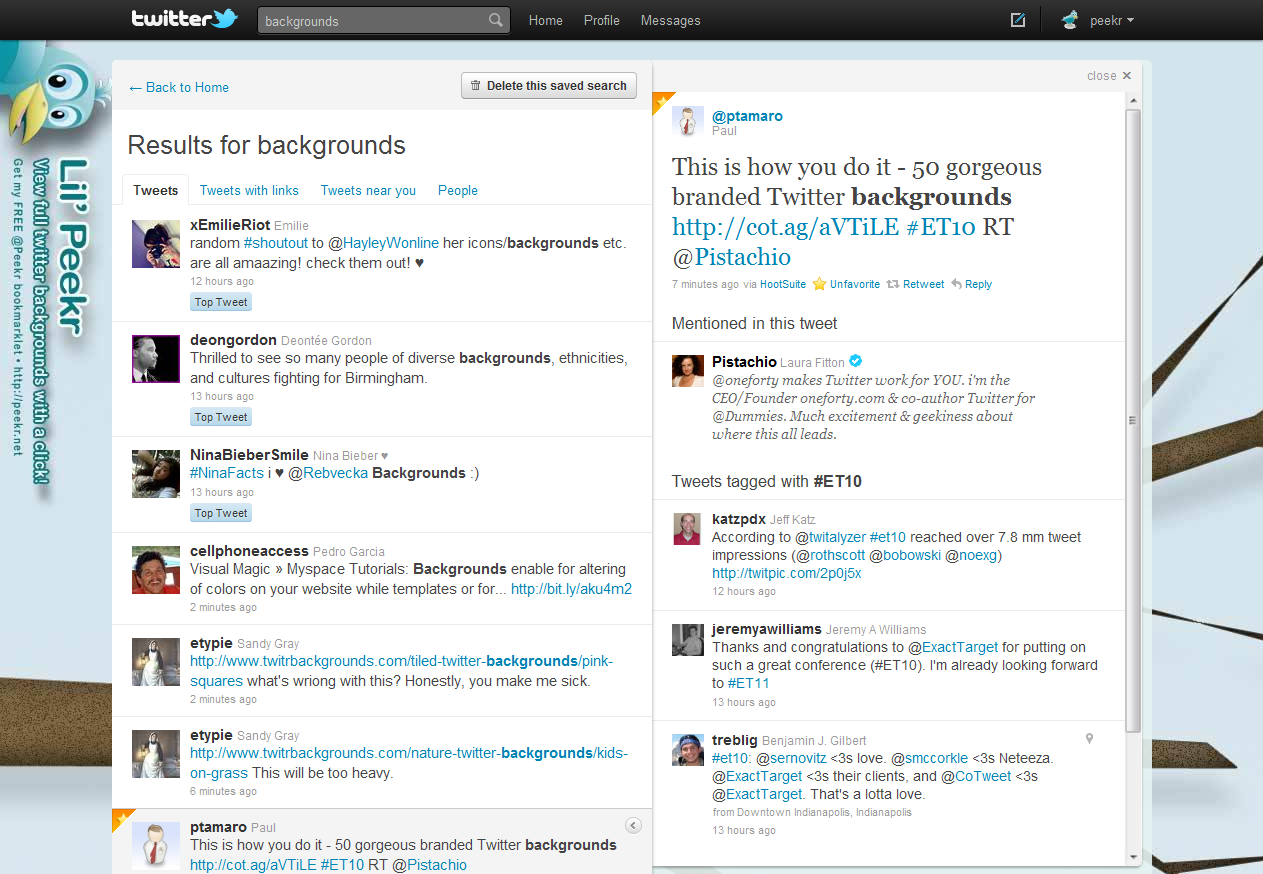
I just logged into my @Peekr account to see what's new with Lil' Peekr and I was given the option to try the new Twitter... so I did, of course. I figured I'd grab a few screenshots for other folks that have not seen it yet and give folks a taste of what they might be missing (or think they're missing anyway). The screenshots below were taken while logged into Twitter using my @Peekr account via web as I was beginning to test the new UI with the @Peekr bookmarklet.

This Too Shall Pass, I Think?


Sadly, as I took a brief cursory look it seems like the new UI uses several different ID's which breaks the peekr bookmarklet version 2.0 — not the concept, just the current JavaScript. I'm thinking of possible fixes or a solution so stay tuned, but be forewarned I might not be able to fix it — and it's football and hockey season, so it may take a while if I even decide to bother with it.

Oddly enough, as I logged out and back in again with my other account it was actually comforting to use the old style Twitter web interface — which is still an option after you've tried the new one (at least for a while anyway). I've used so many Twitter clients over the years so it really doesn't matter much to me anyway.

Note that the full size screen captures are fairly large in terms of resolution and file size. Sorry. It's late, I'm tired, almost out of beer and I want to get this post done...

New Twitter Screenshots


Everything In One Place


Everything In One Place

Shortcuts


Shortcuts

TweetBox


TweetBox

Profile


Profile

Messages


Messages

Mentions


Mentions

Retweets


Retweets

Search for: 'backgrounds' With Links


Search for: 'backgrounds' With Links

Search for: 'backgrounds' People


Search for: 'backgrounds' People

Search for: 'backgrounds' People » More Info


Search for: 'backgrounds' People » More Info

Doh! Nope, it ain't really workin'...


Doh! Nope, it ain't really workin'...


Google Voice In Your Gmail Inbox (Screenshots)

Google Voice IconIf you haven't heard the news just yet, Google has rolled-out the ability to make Google Voice calls directly from your Gmail account (among other things).  I gave it a try and it looks more than just promising.  Why not get your geek on and check it out for yourself?  Or, check out the links and some screenshots below to get a better idea of what it's all about...

The rates are posted for international calls and they're competitive, if not insanely low.  Calls in the U.S. and Canada are free in 2010.

Get The Sauce From The Source


A Few Screen Scraps


Official Tweet Buttons In Action

Sharing is fun!

The Bell Curve Rings

 
I love to try new stuff and I'm definitely an early adopter in terms of new products and technology, art and design, and a host of other things. That said, I recently noticed a few posts on an "Official Tweet Button" which I initially thought was a rumor, then did a little surfing and found that — not only was it real, but it was already out in the wild!  

Crazy.  

It's tough to keep on top of things.  

Surf, read... share.  


Not Quite the Speed of Light, but...

 
The reason for my post on the topic is that I was amazed at how quickly things progressed. Yeah, rumors and blog posts about Twitter abound — it's ubiquitous — but this particular item struck me as unusually quick to come to life. I obviously understand that the typical web development cycle can and usually does take time, and I'm sure the process of designing and creating this new feature involved a team of people and plenty of thought, time and effort — but this one felt like it came to fruition at close to the speed of light.

Sharing is Sexy


I thought I'd add an example of the new Official Tweet Button in action because I think it'll really do well, I love to share stuff so I plan to use it a LOT and it's incredibly easy to implement (see the example at the bottom of this post). Adding it is cut-n-paste easy.

Here's an example of one super-simple method (there already are several ways to do it). Just add this to your code:

<script src="http://platform.twitter.com/widgets.js" type="text/javascript"></script>
<a href="http://twitter.com/share" class="twitter-share-button" title="Tweet it!">Tweet</a>


And you should get an Official Tweet Button like this:


...have fun sharing! Oh, and feel free to follow me on Twitter and tweet this post if you found it useful, why not? Sharing is caring ;-)


New Gmail enhancements

I'm the type of guy who almost always checks my email before doing anything else in the morning when I first sit-down in front of my computer. The only thing I do before this, of course, is make a fresh pot of coffee and pour myself a mug...

It's a ritual.

Historically Geeky


I've used Gmail as my primary mail client since it was first available in 2004, and it just keeps getting better. I love it's simplicity, and the way Google has been rolling new features into it over time rather than a big "upgrade" or "redesign" as I've witnessed and experienced in other products.

Gmail logo icon by Sephiroth6779I like the subtle changes and there's a feeling of 'delight' that this type of staggered (i.e.: Agile) feature roll out approach offers for the user. It also makes it possible for the developers to really focus on the implementation and get feedback early and often to squash any bugs and resolve any unforeseen front-end glitches more effectively as well. With this approach, everybody wins.

It's Delightful & Delicious


Today I had a pleasant surprise when I noticed some minor, yet really nice improvements in the way that Gmail presents their Tool-tip (a.k.a.: "HoverCard" information). These are admittedly not Earth-shattering changes, but they were a nice surprise nonetheless, so I thought I'd blog about it to see if other folks are also seeing these changes in their Gmail client.

Hover Info; Chat Column


Small screenshot #1 from Gmail; Click for larger image »The presentation of info is much better when you hover over a user's name in the chat column — much cleaner and more like a business card where the order of elements is better organized, and the buttons are placed on the bottom of the card. I really like this because the structure makes more sense, and it feels more natural to me.


Hover Over Sender Info


Small screenshot #2 from Gmail; Click for larger image »The other improvement I noticed isn't a huge change, but it is better in my opinion. When you hover over the sender's name you get the same presentation, treatment and structure as you do with the user's name. Same look, same feel, same structure: buttons on the bottom. I'm a big fan of consistency and this is also important in terms of usability.

If you're not using Gmail, I suggest you take a look at it and consider doing so. If you are using Gmail already, then I also think it's a good idea to check the Google Labs section every now and then or subscribe to the Official Gmail Blog RSS feed to find out if there's anything new you might want to try.


Cool: MouseGlove | Next-gen mouse

MouseGlove

Not your average input device; this interesting open source project aims to make human-computer interaction easier.


MouseGlove is an open source project for a new generation of mouse. The goal of this project is to provide an open source hardware and software stimulating new developers to improve the usability of computers through new interfaces.

MouseGlove is a new kind of interface born for helping people affected by disabilities who cannot use common interfaces such as mouse and keyboard. MouseGlobe offers a natural way to move the screen pointer, click and drag objects. Each action is natural as using your hands to keep, move and touch real objects on a desktop.

http://mouseglove.sourceforge.net/

Posted via web from ptamaro | posterous


Beyond Sight: An Experiment, Tribute and Celebration of the Inspiring Lives of the Visually Impaired.

Summary


Beyond Sight is a documentary following the everyday lives of some incredible visually-impaired individuals.

The Purpose


Blindness and visual impairments in the media have often been portrayed as something negative, a handicap, something to be feared. This movie is going to be different - amazing accomplishments and incredible lives, which would be amazing whether or not the individuals are blind. So, we are portraying visual impairments in a positive light! These stories deserve to be told.

The Project


http://kck.st/bliYvz

Still Haven't Found What You're Lookin' For?

Magnifying glass

Try these Social Media search engines, and if nothing else — I think you'll definitely find that you like 'em.


I surf a lot, and I do a fair amount of the Social Media stuff as well. Oftentimes, I find it difficult to get at specific bits of niche oriented information using the big engines — even with well crafted 'advanced search' criteria. This is especially true when trying to track real-time topics, unusual terms, odd trends and memes. Have you encountered this, or ever felt this way? Have you gone through multiple pages of search results on well-known search engines without finding what you were looking for — or even anything remotely close?

Recently, I've stumbled upon (or folks have shared with me on my Twitter account, @ptamaro) some really cool and powerful Social Media real-time search engines I thought I'd share with you. Below are some really cool social oriented search tools with features that go beyond what you'll see on the big engines. Although these tools are relatively new to me, I think I've seen enough to feel like they're going to help me to be more productive as I continue to use them and become more familiar with their specific features.

If you think I'm totally missing "a killer social search app" that you think should be included here, let me know. I'm always on the lookout for the next best thing...

I'll highlight three very cool and ultra powerful social media oriented search engines. I strongly encourage you try them all, and see what you think. This isn't intended to be an extensive analysis, but rather a somewhat cursory look at a few of the lesser known tools available to help you find the things you're looking for, and maybe some interesting little surprises along the way. The search terms I used were "backgrounds" and "fibonacci".


Check out socialmention* Real-time social media search and analysis »

socialmention* Real-time social media search and analysis


@socialmention


This is an ultra cool and incredibly powerful social media search tool. The interface is beautiful, inviting, sophisticated and very slick. It's usability is fantastic and extremely intuitive. You can perform your search within more than eleven categories, and across more than 80 social networks and sources. It feels like a "social media über search" for lack of a better description — in their words, it's "a real time search platform" so it's a little bit more than an engine or tool.

It was tough to find anything that could be improved here. I guess it would be nice to have the source selection checkboxes grouped in a more logical way? For instance, the sources are listed in columns and alphabetized from left to right which seems awkward to me. Maybe it's just me. Nonetheless, it's hard to find any flaws which is unusual! This is how social search should be done. Period.

  • Comprehensive list of networks and services

  • Social Mention Alerts

  • Aggregated trend data

  • Single stream of real-time data available via API

  • A series of tools and widgets: Realtime Buzz Widget, Browser Search Plugin, iGoogle Gadget (coming soon)

  • Data-rich real-time results with analysis ratings and filters, hover tips, sorting, top keywords and hashtags

  • Export CSV/Excel, RSS feeds

  • Much, much more...


Check out WhosTalkin? Social Media Search Tool »

WhosTalkin? Social Media Search Tool


@whostalkin


This is a very unique engine with one of the most elegant and intuitive interfaces I've seen in a while. If I had only one word to describe it, that word would be: amazing. This engine allows you to run your search across more than 50+ sources within multiple categories.

The few shortcomings I noticed could easily be fixed. For example, there are way too many "back to top" links and that space could be replaced by something useful. Also, it's not entirely clear what source the results you're looking at are from — which can be a problem if you're quickly running searches across multiple social networks. This too can be easily fixed by displaying the category and network the results you're currently presented with are from. For instance, the content description at the top of the results could read, "Results for fibonacci' within: Blogs » Twitter" so the user would know exactly what they are looking at. A few more well thought out features may just be the icing this cake needs. That said, it's still awesome because of it's overall solid positive user experience.

  • Left navigation accordion allows you to quickly run searches through multiple categories and networks

  • Very intuitive user interface and it's really fun to use

  • They offer an iGoogle Gadget, and an API

  • Results are a bit basic in terms of the richness of data

  • Feels like it could use a few more features


Check out IceRocket real-time search »

IceRocket real-time search


@icerocket


This is a really powerful engine... and I think it's been around for a while. I've found some really juicy stuff using it. I really like it. I think the only downside of this engine is a slightly inconsistent user interface across screens which is a bit jarring.

This is a very cool data-rich engine with some unusually powerful features. A few tweaks to the layout consistency would go a long way — but these minor shortcomings are far outweighed by the overall value it provides.

  • Search by category; for example a social network (Twitter, MySpace), content type (video, images), blogs, news, the web, or the "big buzz"

  • Easily run the same search multiple times within each category with a simple click

  • Follow trends, submit your blog and use other tools like RSS Builder, Blog Tracker, or their API

  • When searching Twitter you have the opportunity to reply to or re-tweet directly from the search results, the results are updated real-time as more become available

  • You can easily save your search and run it again later, and alerts are in the works

  • Lots of information about the data you're looking at


I have a few more engines in the toolbox, but they take a slightly different approach and seem to be in another category altogether, so maybe I'll do another post since this one was a lot of fun. Comments and suggestions are welcome, and feel free to tweet me any time with your thoughts. What's your favorite social engine?

HootSuite for iPhone is available...


Everybody dance now!


You’ll love the ability to customize tabs and columns, and easy-to-use column swiping to switch between streams. Did we mention you can upload pictures with HootSuite for iPhone? Indeed, you can. You can also view pending tweets, read explanations for why topics trend on Twitter, and save searches as permanent streams. There is so much to love about HootSuite for iPhone. But don’t take our word for it. Try it yourselves.hootsuite.com, HootSuite, Dec 2009


HootSuite for iPhone is the only Twitter app that lets you view statistics, and the only one that lets you schedule your tweets in advance. With HootSuite, you can send tweets to multiple accounts simultaneously whenever/wherever you are. But that's not all. You should read the whole article to get the skinny on all the juicy new features. If you have an iPhone and you tweet -- HootSuite rocks.


Follow me on Twitter to get your tweet on: @ptamaro

http://twitter.com/ptamaro